story#: Fix bug that readonly option doesn’t setup with volume create.
요약
참고
openstack volume create –size 1 –read-only <volume name> 명령어 수행 시 '–read-only' option을 주었지만 해당 option은 처리가 안되고 에러 메세지를 출력하며 option이 적용되지 않은 volume이 생성되는 버그
0. PR 전 버그 수정 과정
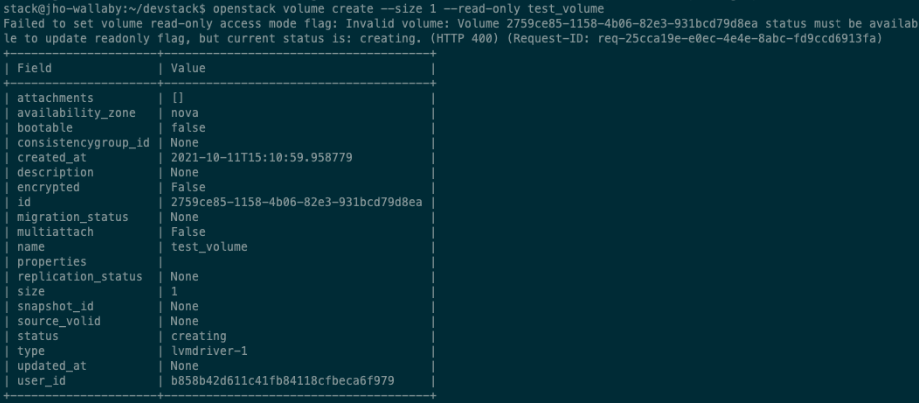
openstack volume create –size 1 –read-only <volume name> 명령어 수행 시 readonly option에 대한 에러가 처리되며 readonly option이 적용되지 않은 volume이 생성된 것을 다음과 같이 확인할 수 있다.
해당 버그를 해결하기 위해 python-openstackcli.openstackclient.volume.v2.volume.py 파일 코드를 분석했습니다.
def update_readonly_flag(self, context, volume, flag):
     context.authorize(vol_action_policy.UPDATE_READONLY_POLICY,
                         target_obj=volume)
     if volume['status'] != 'available':
         msg = _('Volume %(vol_id)s status must be available '
                 'to update readonly flag, but current status is: '
                 '%(vol_status)s.') % {'vol_id': volume['id'],
                                       'vol_status': volume['status']}
         raise exception.InvalidVolume(reason=msg)
     self.update_volume_admin_metadata(context.elevated(), volume,
                                       {'readonly': str(flag)})
     LOG.info("Update readonly setting on volume "
              "completed successfully.",
              resource=volume)
if volume['status'] != 'available' : 해당 구문을 보면 volume.id 로 넘겨준 volume의 status가 available이 아니면 에러를 처리하게 되어 있다.
volume_client.volumes.create 으로 생성된 volume의 status가 바로 available이 되는 것이 아니라 잠시 creating 상태에 있기에 에러가 발생하며 –read-only 옵션이 처리가 되지 않았다.
이를 해결하기 위해 다음 코드와 같이 volume.py 에서 volume의 api 를 호출하여 상태 체크를 계속 해주었습니다.
# 추가 코드 1
while volume.status == "creating":
     volume = volume_client.volumes.get(volume.id)

if parsed_args.bootable or parsed_args.non_bootable:
     try:
         volume_client.volumes.set_bootable(
             volume.id, parsed_args.bootable)
     except Exception as e:
         LOG.error(_("Failed to set volume bootable property: %s"), e)
if parsed_args.read_only or parsed_args.read_write:
     try:
         volume_client.volumes.update_readonly_flag(
             volume.id,
             parsed_args.read_only)
     except Exception as e:
         LOG.error(_("Failed to set volume read-only access "
                     "mode flag: %s"), e)
# 추가 코드 2
volume = volume_client.volumes.get(volume.id)
해당 버그를 수정하니 또 다른 에러를 발견했다.
readonly 옵션으로 volume 인스턴스를 생성한 결과 출력되는 volume 정보에는 –read-only option이 빠져있었지만 다시 show 명령어로 확인한 결과 정상적으로 readonly option이 적용이 되어 있었다.
- 원인
출력해주는 volume 값을 바꾸지 않아 readonly 옵션을 주어도 생성 결과 출력값에는 빠져있었던 것이었다.
- 해결방안
모든 옵션을 처리하고 마지막에 volume api를 호출하여 volume 값을 업데이트 해주는 방향으로 코드를 수정했다.
수정 코드를 tox를 통해 test case를 돌리던 중 에러가 발생했다. 추가 코드 2 로 인해 발생하는 문제였다.
- 원인
test를 돌리면 fake volume object 의 get API 가 제대로 호출 되지 않아 에러가 발생했다.
- 해결방안
self.volumes_mock.get.return_value = self.new_volume
해당 명령어를 TestVolumeCreate class 의 setUp 메서드에 추가해주어 create fake_volume object 시 생성된 fake object 가 get API 를 호출할 수 있게끔 수정했다.
위와 같이 코드 수정을 마치고 첫번째 PR 을 올렸다.
1. 첫번째 PR 에 대한 리뷰 및 코드 수정
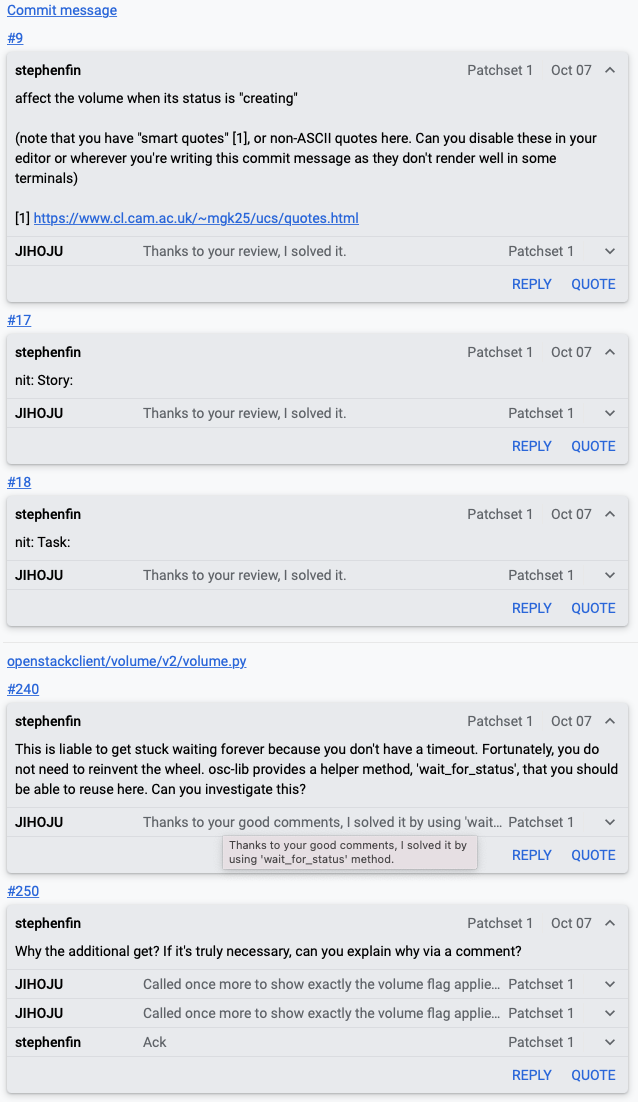
첫번째 PR에 maintainer 님이 코드 리뷰 후 comment를 달아주셨다.
참고
volume 의 status 가 'available' 이 될 때까지 while 문으로 묶어주면 무한 루프에 빠지는 위험이 있을 수 있으며 코드 상 보기에 깔끔하지 않아 기존에 만들어진 'wait_for_status' 메서드를 활용해서 코드를 수정하라는 피드백을 받았다.
if parsed_args.read_only or parsed_args.read_write:
     sys.stdout.write("Waiting for volume to be created.\n")
     if utils.wait_for_status(
             volume_client.volumes.get,
             volume.id,
             success_status=['available'],
             error_status=['error'],
             sleep_time=1
     ):
         try:
             volume_client.volumes.update_readonly_flag(
                 volume.id,
                 parsed_args.read_only)
         except Exception as e:
             LOG.error(_("Failed to set volume read-only access "
                         "mode flag: %s"), e)

     volume = volume_client.volumes.get(volume.id)
maintainer 님이 주신 피드백을 통해 코드를 다음과 같이 수정 후 문제 없이 잘 동작하는 것을 확인했다.
하지만 test case 를 돌리는 중 'wait_for_status' 메서드 내에서 무한루프 가 도는 문제점을 확인했다.
이를 위해 'wait_for_status' 메서드 내 코드를 분석했다.
def wait_for_status(status_f,
                    res_id,
                    status_field='status',
                    success_status=['active'],
                    error_status=['error'],
                    sleep_time=5,
                    callback=None):
     while True:
         res = status_f(res_id)
         status = getattr(res, status_field, '').lower()
         if status in success_status:
             retval = True
             break
         elif status in error_status:
             retval = False
             break
         if callback:
             progress = getattr(res, 'progress', None) or 0
             callback(progress)
         time.sleep(sleep_time)
     return retval
volume create API 는 volume 의 status 의 return 값을 'available', 'creating', 'error' 만 있다고 공식문서에서 정의하고 있다.
하지만 test case 에선 랜덤으로 'in_use' status 를 받아 wait_for_status 에서 무한루프가 도는 것이다. 'in_use' status 값을 갖는 이유는 FakeVolume class 내 create_one_volume 메서드 내에서 fake volume status 값을 'in_use', 'available' 을 랜던하게 갖게 한다.
해당 문제를 해결하고자 다음과 같이 코드를 수정했다.
# fakes.py
class FakeVolume(object):
     """Fake one or more volumes."""

     @staticmethod
     def create_one_volume(attrs=None,
                           status=['available', 'in_use']):
     ...

# test_volume.py
self.new_volume = volume_fakes.FakeVolume.create_one_volume(
             status=['available']
         )
FakeVolume 객체가 생성될 때 status 를 받을 수 있도록 코드를 수정하고 이 메서드를 호출할 때는 'available' 만 status 를 가질 수 있도록 코드를 수정했다.
이처럼 모든 에러를 처리하고 2번째 PR을 올렸으며 현재 maintainer 님의 review 를 기다리고 있다.